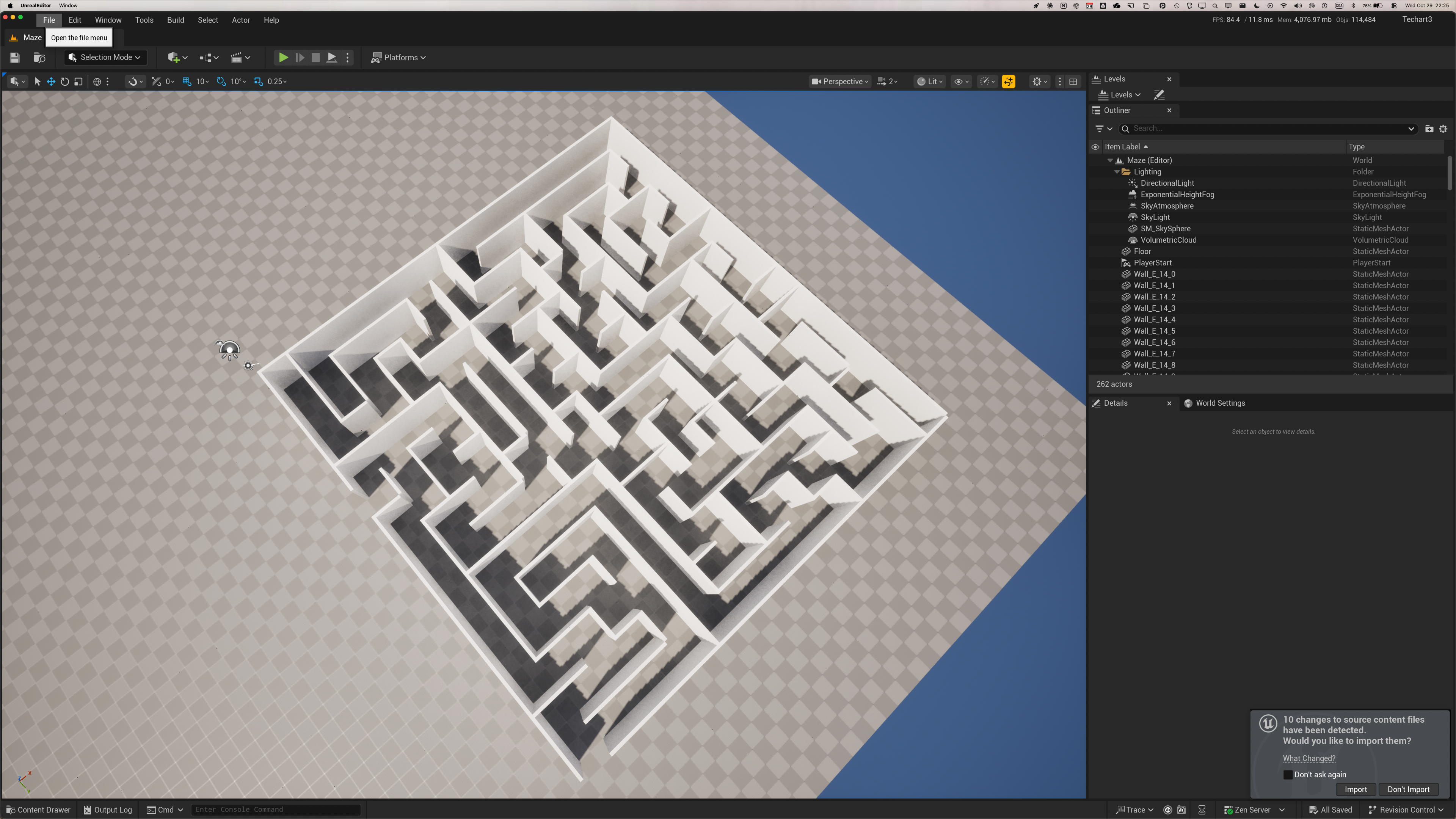
Mon tout premier projet professionnel 3D - Parcours 3D dans un labyrinthe, commande par la voix
/*========================================================================*\|| |||| MODULE : MAZE.C |||| |||| |||| DESCRIPTION: Programme qui genere un labyrinthe 2-D a l'aide de |||| l'algorithme du "spanning tree" (arbre de recouvrement). |||| |||| REMARQUES : L'impression est en mode texte. |||| |||| |||| AUTEUR : Karim Aktouf |||| |||| CREATION : le 10 aout 1993 <-- VOUS N'ÉTIEZ PAS NÉS! |||| |||| REVISION : le 13 aout 1993 |||| le 03 juin 1996 - Les parametres ont maintenant une |||| valeur par defaut, et ajout de deux |||| autres parametres pour specifier le |||| charactere pour les lignes horizontales |||| et celui des lignes verticales. |||| ||\*========================================================================*/#include <stdio.h>#include <stdlib.h>#include <time.h>typedef enum _bool {FALSE, TRUE} BOOL;typedef unsigned TypedeCell;#define AUCUN 0#define SPAN 1#define FRONTIERE 2typedef unsigned TypedeCase;#define FERMEE 0#define OUVERTE 1/* La norme ANSI veut pas de enum dans des bit fields !!! * Dommage, c'est elegant... * * typedef enum _TypedeCell {AUCUN, SPAN, FRONTIERE} TypedeCell; * typedef enum _TypedeCase {FERMEE, OUVERTE} TypedeCase; */typedef struct _Cell Cell;typedef struct _FCell FCell;struct _Cell{ TypedeCell Type:2; TypedeCase Bas:1, Droite:1;};struct _FCell /* Element de la liste circulaire de cellules */{ /* frontiere */ int L; int C; FCell *Next; FCell *Prev;};/*========================================================================*\|| |||| Prototypes des fonctions utilisees |||| ||\*========================================================================*/Cell **InitMaze (void);void GenerateMaze (int L, int C);void PrintMaze (char H, char V);void AddToFList (FCell *FPtr);void RemoveFromFList (FCell *FPtr);void MarkAdj (int L, int C, TypedeCell T);FCell *ChooseRandomF (void);void ConnectToSPAN (int L, int C);/*========================================================================*\|| |||| Variables globables |||| ||\*========================================================================*/Cell **MazePtr = NULL;FCell *FList = NULL;int NbL=10, /* Nombre de lignes */ NbC=10, /* Nombre de colonnes */ NbF=0; /* Nombre d'elements dans FList */char H='|', /* Char. des lignes horizontales */ V='|'; /* Char. des lignes verticales */int main(int argc, char **argv){ time_t t; int i=0; if (argc >= 2) if ((NbL = atoi(argv[1])) < 2) { printf("\nNombre de lignes invalide (%d) doit etre au moins 2.\n", NbL); return -1; } if (argc >= 3) if ((NbC = atoi(argv[2])) < 2) { printf("\nNombre de colonnes (%d) doit etre au moins 2.\n", NbC); return -1; } if (argc >= 4) H=*argv[3]; if (argc >= 5) V=*argv[4]; if (!(MazePtr = InitMaze())) return -1; /* On choisit une cellule au hasard entre i=1..NbL-1 et j=1..NbC-1 */ srand((unsigned) time(&t)); GenerateMaze((rand() % (NbL-1)) + 1, (rand() % (NbC-1)) + 1); PrintMaze(H, V); return 0;}/*========================================================================*\|| |||| Fonction : InitMaze |||| |||| Description: Alloue l'espace memoire necessaire et initialise aux |||| valeurs par defaut chaque cellule du labyrinthe. |||| |||| Parametres : nil |||| |||| Retour : Pointeur a l'espace memoire occupe par le labyrinthe |||| |||| Remarques : Le labyrinthe est organise en matrice 2-D dynamique, |||| c'est-a-dire que le pointeur pointe a une COLONNE de |||| pointeurs contenant NbL pointeurs, chacuns pointant sur |||| une LIGNE de NbC elements. l'acces a la cellule de la |||| LIGNE i, COLONNE J se fait alors par [i][j] tout |||| simplement, comme s'il s'agissait d'un tableau 2-D |||| statique. |||| |||| Auteur : Karim Aktouf |||| |||| Creation : le 10 aout 1993 |||| |||| Revision : le 13 aout 1993 |||| ||\*========================================================================*/Cell **InitMaze(void){ Cell **Maze; int i, j; if (!(Maze = (Cell **) malloc(sizeof(Cell *) * NbL))) return NULL; for (i=0; i < NbL; i++) { if (!(Maze[i] = (Cell *) malloc(sizeof(Cell) * NbC))) return NULL; for (j=0; j < NbC; j++) { Maze[i][j].Type = AUCUN; Maze[i][j].Bas = FERMEE; Maze[i][j].Droite = FERMEE; } } /* Le mur du haut est un peu special */ for (j=0; j < NbC; j++) Maze[0][j].Droite = OUVERTE; /* Meme chose pour le mur de droite */ for (i=0; i < NbL; i++) Maze[i][0].Bas = OUVERTE; return Maze;} /* InitMaze *//*========================================================================*\|| |||| Fonction : GenerateMaze |||| |||| Description: Genere le labyrinthe, en partant de la cellule L,C |||| choisie prealablement au hasard. |||| |||| Parametres : L : Ligne de la cellule choisie au hasard |||| C : Colonne de la cellule choisie au hasard. |||| |||| Retour : nil |||| |||| Remarques : Pour ne pas generer a chaque fois le meme labyrinthe |||| avec les meme parametres, il faut s'assurer |||| d'initialiser le generateur de nombre aleatoires a une |||| valeur differente a chaque fois. Pour ce faire, il faut|||| se baser sur la valeur de l'horloge de l'ordinateur, qui|||| varie tout le temps: |||| |||| |||| #include <time.h> |||| #include <stdio.h> |||| |||| void main(void) |||| { |||| time_t t; int i; |||| |||| srand ((unsigned) time(&t)); |||| |||| for (i=0; i < 100; i++) |||| printf("%d ",rand() % 100); |||| } |||| |||| |||| Ce bout de code generera 100 nombres aleatoires |||| differents a chaque appel du programme. Si on omet le |||| srand(nombre associe a l'horloge), la meme serie de |||| nombres pseudo-aleatoires sera generee a chaque fois. |||| |||| Auteur : Karim Aktouf |||| |||| Creation : le 10 aout 1993 |||| |||| Revision : le 13 aout 1993 |||| ||\*========================================================================*/void GenerateMaze(int L, int C){ FCell *FPtr; int LL, CC; /* On marque la cellule choisie au hasard comme etant SPAN */ MazePtr[L][C].Type = SPAN; /* On marque toutes les cellules adjacentes comme etant FRONTIERE */ MarkAdj(L, C, FRONTIERE); while (FList) /* Tant que la liste des cellules frontieres n'est pas vide */ { /* On choisit une cellule frontiere au hasard */ FPtr = ChooseRandomF(); /* On la marque comme etant SPAN */ LL = FPtr->L; CC = FPtr->C; RemoveFromFList(FPtr); MazePtr[LL][CC].Type = SPAN; /* On la connecte a une cellule SPAN adjacente prise au hasard */ ConnectToSPAN(LL, CC); /* On marque les cellules adjacentes de type AUCUN a FRONTIERE */ MarkAdj(LL, CC, FRONTIERE); } /* On choisit l'entree... */ MazePtr[1][0].Droite = OUVERTE; /* et la sortie. */ MazePtr[NbL-1][NbC-1].Droite = OUVERTE;} /* GenerateMaze *//*========================================================================*\|| |||| Fonction : ChooseRandomF |||| |||| Description: Choisit au hasard une cellule frontiere parmis la liste |||| de cellules frontieres. |||| |||| Parametres : nil |||| |||| Retour : Pointeur a la cellule choisie. |||| |||| Remarques : nil |||| |||| Auteur : Karim Aktouf |||| |||| Creation : le 10 aout 1993 |||| |||| Revision : le 11 aout 1993 |||| ||\*========================================================================*/FCell *ChooseRandomF(void){ int tmp = (rand() % NbF) + 1; int i=1; FCell *FPtr = FList; while (i++ != tmp) FPtr = FPtr->Next; return FPtr;} /* ChooseRandomF *//*========================================================================*\|| |||| Fonction : ConnectToSPAN |||| |||| |||| Description: Connecte la cellule L,C a une cellule SPAN adjacente, |||| prise au hasard. |||| |||| Parametres : L : Ligne de la cellule a connecter |||| C : Colonne de la cellule a connecter |||| |||| Retour : nil |||| |||| Remarques : nil |||| |||| Auteur : Karim Aktouf |||| |||| Creation : le 12 aout 1993 |||| |||| Revision : le 13 aout 1993 |||| ||\*========================================================================*/void ConnectToSPAN(int L, int C){ BOOL Span_Adj[4] = {FALSE}; int NbSpanAdj = 0; int tmp, i, j, SpanToConnect; /* cellule adjacente du haut */ if ((L-1 > 0) && (MazePtr[L-1][C].Type == SPAN)) { Span_Adj[0] = TRUE; NbSpanAdj++; } /* cellule adjacente de droite */ if ((C+1 < NbC) && (MazePtr[L][C+1].Type == SPAN)) { Span_Adj[1] = TRUE; NbSpanAdj++; } /* cellule adjacente du bas */ if ((L+1 < NbL) && (MazePtr[L+1][C].Type == SPAN)) { Span_Adj[2] = TRUE; NbSpanAdj++; } /* cellule adjacente de gauche */ if ((C-1 > 0) && (MazePtr[L][C-1].Type == SPAN)) { Span_Adj[3] = TRUE; NbSpanAdj++; } if (NbSpanAdj < 1) /* Ne devrais jamais arriver!!! */ { printf("\nWow!!! Pas de cellule SPAN adjacente a Cell(%d, %d)!!!!\n", L, C); exit(-1); } if (NbSpanAdj == 1) { tmp=-1; while(Span_Adj[++tmp] == FALSE) ; SpanToConnect = tmp; } else { tmp = (rand() % NbSpanAdj) + 1; i=0; for (j=0; j < 4; j++) { if (Span_Adj[j] == TRUE) { if (++i == tmp) { SpanToConnect = j; break; } } } } /* Ok, La cellule adjacente numero SpanToConnect est la SPAN a connecter */ switch(SpanToConnect) { case 0: MazePtr[L-1][C].Bas = OUVERTE; break; case 1: MazePtr[L][C].Droite = OUVERTE; break; case 2: MazePtr[L][C].Bas = OUVERTE; break; case 3: MazePtr[L][C-1].Droite = OUVERTE; break; }} /* ConnectToSPAN *//*========================================================================*\|| |||| Fonction : MarkAdj |||| |||| Description: Marque comme etant de type FRONTIERE toutes les cellules|||| de type AUCUN voisines de la cellule L,C |||| |||| Parametres : L : Ligne de la cellule dont on doit marquer les |||| cellules adjacentes. |||| C : Colonne de la cellule dont on doit marquer les |||| cellules adjacentes. |||| |||| Retour : nil |||| |||| Remarques : nil |||| |||| Auteur : Karim Aktouf |||| |||| Creation : le 11 aout 1993 |||| |||| Revision : le 11 aout 1993 |||| ||\*========================================================================*/void MarkAdj(int L, int C, TypedeCell T){ FCell *FPtr; /* Cellule adjacente du haut */ if (L-1 > 0) { if (MazePtr[L-1][C].Type == AUCUN) { MazePtr[L-1][C].Type = T; if (!(FPtr = (FCell *) malloc(sizeof(FCell)))) { printf("\nPas assez de memoire pour FPtr\n"); exit(-1); } FPtr->L = L-1; FPtr->C = C; AddToFList(FPtr); } } /* Cellule adjacente du bas */ if (L+1 < NbL) { if (MazePtr[L+1][C].Type == AUCUN) { MazePtr[L+1][C].Type = T; if (!(FPtr = (FCell *) malloc(sizeof(FCell)))) { printf("\nPas assez de memoire pour FPtr\n"); exit(-1); } FPtr->L = L+1; FPtr->C = C; AddToFList(FPtr); } } /* Cellule adjacente de gauche */ if (C-1 > 0) { if (MazePtr[L][C-1].Type == AUCUN) { MazePtr[L][C-1].Type = T; if (!(FPtr = (FCell *) malloc(sizeof(FCell)))) { printf("\nPas assez de memoire pour FPtr\n"); exit(-1); } FPtr->L = L; FPtr->C = C-1; AddToFList(FPtr); } } /* Cellule adjacente de droite */ if (C+1 < NbC) { if (MazePtr[L][C+1].Type == AUCUN) { MazePtr[L][C+1].Type = T; if (!(FPtr = (FCell *) malloc(sizeof(FCell)))) { printf("\nPas assez de memoire pour FPtr\n"); exit(-1); } FPtr->L = L; FPtr->C = C+1; AddToFList(FPtr); } }} /* MarkAdj *//*========================================================================*\|| |||| Fonction : AddToFList |||| |||| Description: Ajoute l'element pointe par FPtr dans la liste |||| circulaire a double liens des cellules de type FRONTIERE|||| |||| Parametres : FPtr : Pointeur a l'element a ajouter. |||| |||| Retour : nil |||| |||| Remarques : nil |||| |||| Auteur : Karim Aktouf |||| |||| Creation : le 10 aout 1993 |||| |||| Revision : le 10 aout 1993 |||| ||\*========================================================================*/void AddToFList(FCell *FPtr){ if (!FList) { FList = FPtr; FList->Next = FList; FList->Prev = FList; } else { FList->Prev->Next = FPtr; FPtr->Next = FList; FPtr->Prev = FList->Prev; FList->Prev = FPtr; } NbF++;} /* AddToFList *//*========================================================================*\|| |||| Fonction : RemoveFromFList |||| |||| Description: retire de la liste circulaire l'element pointe par FPtr.|||| |||| Parametres : FPtr : Pointeur a l'element a retirer. |||| |||| Retour : nil |||| |||| Remarques : nil |||| |||| Auteur : Karim Aktouf |||| |||| Creation : le 10 aout 1993 |||| |||| Revision : le 10 aout 1993 |||| ||\*========================================================================*/void RemoveFromFList(FCell *FPtr){ if (FList->Next == FList) { free(FList); FList = NULL; } else { if (FList == FPtr) FList = FPtr->Next; FPtr->Prev->Next = FPtr->Next; FPtr->Next->Prev = FPtr->Prev; free(FPtr); } NbF--;} /* RemoveFromFList *//*========================================================================*\|| |||| Fonction : PrintMaze |||| |||| Description: Imprime le labyrinthe en mode texte. Chaque cellule |||| est representee par: |||| |||| Case toujours ouverte-> HV <- Case droite, OUVERTE, FERMEE |||| |||| Case Bas, OUVERTE, -> VH HV <- Case toujours fermee |||| FERMEE |||| |||| Parametres : nil |||| |||| Retour : nil |||| |||| Remarques : nil |||| |||| Auteur : Karim Aktouf |||| |||| Creation : le 12 aout 1993 |||| |||| Revision : le 12 aout 1993 |||| ||\*========================================================================*/void PrintMaze(char H, char V){ int i, j; printf("\n\nMaze %dx%d:", NbL, NbC); for (i=0; i < NbL; i++) { printf("\n"); for (j=0; j < NbC; j++) if (MazePtr[i][j].Droite == OUVERTE) printf(" "); else printf(" %c%c", H, V); printf("\n"); for (j=0; j < NbC; j++) if (MazePtr[i][j].Bas == OUVERTE) printf(" %c%c", H, V); else printf("%c%c%c%c", V, H, H, V); } printf("\n");} /* PrintMaze */
Générateur de Labyrinthes
Un peu de théorie
Here's some info I wrote up once for a C class assignment. I can send you C
code if you want, but your request asked for the algorithm...
Dr. Rick Perry, ECE Department, Villanova University, Villanova, PA 19085
215-645-4969, fax: 215-645-4436, hm: 215-259-8734
Creating a maze
Here is an example of a maze of size 5 by 8:
	        0   1   2   3   4   5   6   7
	     XXXXXXXXXXXXXXXXXXXXXXXXXXXXXXXXXX
     0 XX  XX              XX          XX
	     XX  XX  XXXXXX  XXXXXX  XXXXXX  XX
     1 XX  XX  XX                  XX
	     XX  XXXXXXXXXXXXXX  XXXXXXXXXX  XX
     2 XX  XX              XX  XX
	     XX  XXXXXX  XXXXXX  XX  XX  XX  XX
     3 XX                  XX  XX  XX  XX
	     XX  XX  XXXXXX  XXXXXX  XX  XXXXXX
     4 XX  XX  XX          XX  XX      XX
       XXXXXXXXXXXXXXXXXXXXXXXXXXXXXXXXXX
The maze is a two-dimensional array of cells. In this display, each cell
is two-characters high and 4 characters wide. There are two blanks in
the top left corner of each cell, and two X’s in the bottom right corner
of each cell. Each cell has a right wall and a bottom wall which may or
may not be open. For example, cell (0,0) has its right wall closed and
its bottom wall open, cell (0,1) has both walls open, cell (1,1) has both
walls closed.
In addition to the cells of the maze, a top wall of X’s and a left wall of XX’s
(with one opening for the maze entrance) comprise the display of the maze.
The bottom wall of the maze is formed by the last row of cells, none of which
have their bottom wall open. The right wall of the maze is formed by the last
column of cells, one of which has its right wall open for the maze exit.
Note that there is only one path between any two cells of the maze. Any cell
can be reached from another cell by a unique path. Such a set of paths between
cells is called a spanning tree. The creation of a maze starts with the all
the cell walls closed and systematically opens cell walls until the complete
spanning tree is formed. The maze entrance and exit are then chosen at
random or fixed locations on opposite sides of the maze.
During the formation of the maze, there will be three types of cells in the
array:
- those that are already in the spanning tree.- those that are not in the spanning tree but are immediately adjacent to some cell in the spanning tree. These cells are called Frontier Cells.- all the other cells, which are neither in the spanning tree nor the frontier.
A bit-field structure, together with some symbolic constants for the
allowed values of the fields, is appropriate to represent a maze cell,
for example:
#define NEITHER 0 /* kinds of cells */#define SPANTREE 1#define FRONTIER 2#define CLOSED 0 /* walls */#define OPEN 1typedef struct { unsigned int kind : 2; /* NEITHER, SPANTREE, or FRONTIER */ unsigned int down : 1; /* CLOSED or OPEN */ unsigned int right: 1; /* CLOSED or OPEN */} Cell;
If cell is a two-dimensional array of these Cell’s, then typical statements
using cell would be:
1. Randomly choose any cell of the array and mark it as a spanning tree cell. The four cells immediately adjacent to it (fewer if it is on an edge or in a corner) are then marked as frontier cells.Repeat Steps 2 and 3 until there are no frontier cells left:2. Randomly choose a frontier cell and connect it to one cell of the current spanning tree by opening one wall. If it is adjacent to more than one cell of the spanning tree (it could be adjacent to as many as four), randomly choose one of them to connect it to and mark the appropriate wall as open. Note: to connect cell[i][j] to the cell above it means cell[i-1][j].down = OPEN;3. Check the cells adjacent to the cell just added to the spanning tree. Any such cells that are neither part of the spanning tree nor the frontier must now be marked as frontier cells.
To be able to easily and efficiently choose a random frontier cell in Step 2,
the row and column indices of the frontier cells must be kept in a circularly
linked list. Such a data structure would be declared like:
typedef struct element { int row, col; struct element *next;} Node;
Example illustrating maze creation
In this example, ++ is used instead of XX for the walls so that the F and S
characters, indicating Frontier and Spanning tree cells, stand out clearly.
Principe Fondamental
L'algorithme de backtracking récursif est une méthode de génération de labyrinthes basée sur la recherche en profondeur (Depth-First Search - DFS). Il crée un labyrinthe en "creusant" des passages à travers une grille initialement remplie de murs.
Fonctionnement Étape par Étape
Initialisation
On commence avec une grille où toutes les cellules ont leurs quatre murs (Nord, Sud, Est, Ouest)
Toutes les cellules sont marquées comme “non visitées”
On choisit une cellule de départ (généralement (0,0))
Exploration
Marquer la cellule courante comme “visitée”
Obtenir la liste des cellules voisines non visitées
Décision
Si des voisins non visités existent:
Choisir un voisin aléatoire
Empiler la cellule courante (pour pouvoir y revenir)
Supprimer le mur entre la cellule courante et le voisin choisi
Faire du voisin la nouvelle cellule courante
Répéter depuis l’étape 2
Si aucun voisin non visité n’existe:
Dépiler une cellule (backtracking/retour en arrière)
Faire de cette cellule la cellule courante
Répéter depuis l’étape 2
Terminaison
L’algorithme se termine quand la pile est vide et qu’il n’y a plus de cellule à explorer
Visualisation de l’Algorithme
Étape 1: Départ en (0,0)┌─┬─┬─┐│S│ │ │ S = Start (cellule de départ)├─┼─┼─┤│ │ │ │├─┼─┼─┤│ │ │ │└─┴─┴─┘Étape 2: Exploration vers l'Est┌─┬─┬─┐│S X│ │ X = cellule visitée├─┼─┼─┤│ │ │ │├─┼─┼─┤│ │ │ │└─┴─┴─┘Étape 3: Backtracking quand bloqué┌─┬─┬─┐│S X X│ On revient en arrière├─┼ ┼─┤ puis on explore Sud│ │X│ │├─┼─┼─┤│ │ │ │└─┴─┴─┘... et ainsi de suite jusqu'à ce quetoutes les cellules soient visitées.
Propriétés Mathématiques
Complexité temporelle: O(n) où n est le nombre de cellules
Complexité spatiale: O(n) pour la pile de backtracking
Garanties:
Chaque cellule est visitée exactement une fois
Le labyrinthe est connexe (tous les points sont accessibles)
Le labyrinthe est “parfait” (sans boucles, un seul chemin entre deux points)
La génération est uniforme (tous les labyrinthes possibles ont la même probabilité)
Avantages et Inconvénients
Avantages:
Simple à mettre en oeuvre
Génère des labyrinthes avec de longs couloirs sinueux
Utilisation efficace de la mémoire
Visuellement intéressant (structure organique)
Inconvénients:
Peut créer des labyrinthes avec un biais directionnel
Les chemins ont tendance à être longs et tortueux
Moins de contrôle sur la difficulté du labyrinthe
Histoire de l'Algorithme
Origines et Développement
L’algorithme de backtracking pour la génération de labyrinthes trouve ses racines dans les années 1960-1970, période dorée de l’exploration des algorithmes de graphes.
Contexte Historique
Années 1960 - Les Prémices
L’algorithme de recherche en profondeur (DFS), base du backtracking, est formalisé par les pionniers de l’informatique
Les premiers ordinateurs permettent d’explorer des algorithmes de génération procédurale
Les labyrinthes deviennent un terrain de jeu pour tester les algorithmes de graphes
Années 1970 - Popularisation
Les ordinateurs personnels émergent, rendant la programmation accessible
Les magazines d’informatique publient des algorithmes de génération de labyrinthes
Les jeux vidéo utilisent des labyrinthes procéduraux (début des roguelikes)
Années 1980-1990 - Raffinement
Étude systématique des différentes méthodes de génération
Comparaison des propriétés visuelles et mathématiques
Le recursive backtracking devient l’algorithme de référence pour les labyrinthes “parfaits”
Pourquoi le Backtracking Récursif?
L’algorithme s’est imposé pour plusieurs raisons:
Élégance conceptuelle - L’idée de “creuser” des tunnels en explorant puis en revenant en arrière est intuitive
Simplicité d’implémentation - Quelques dizaines de lignes suffisent
Qualité esthétique - Produit des labyrinthes avec de longs passages sinueux, visuellement satisfaisants
Performance - Complexité linéaire, très rapide même sur de grandes grilles
Variantes et Évolution
Au fil du temps, d’autres algorithmes ont été développés:
Algorithme de Prim - Croissance aléatoire
Algorithme de Kruskal - Union-find sur les arêtes
Division récursive - Diviser et conquérir
Algorithme d’Eller - Génération ligne par ligne
Mais le backtracking récursif reste le plus populaire pour sa simplicité et ses résultats esthétiques.
Architecture du Code
Structure Globale
MazeGenerator (Classe principale)│├── __init__() # Initialisation de la grille├── generate_maze() # Algorithme de backtracking├── create_entrance_exit() # Création des accès└── create_maze_geometry() # Génération 3D dans Blender │ ├── _create_wall() # Création d'un mur individuel ├── _create_floor() # Création du sol ├── _create_markers() # Marqueurs entrée/sortie └── _get_marker_position() # Calcul de position
Diagramme de Flux
┌─────────────────────────┐│ Initialisation ││ - Créer grille ││ - Tous murs présents │└───────────┬─────────────┘ │ ▼┌─────────────────────────┐│ Génération Labyrinthe ││ - Backtracking DFS ││ - Suppression de murs │└───────────┬─────────────┘ │ ▼┌─────────────────────────┐│ Création Entrée/Sortie ││ - Sélection aléatoire ││ - Sur périmètre │└───────────┬─────────────┘ │ ▼┌─────────────────────────┐│ Génération Géométrie ││ - Création murs 3D ││ - Sol et marqueurs │└─────────────────────────┘
Explication Détaillée du Code
1. Initialisation (__init__)
def __init__(self, width=10, height=10, wall_thickness=0.1,
             wall_height=2.0, cell_size=2.0):
    self.width = width
    self.height = height
    self.wall_thickness = wall_thickness
    self.wall_height = wall_height
    self.cell_size = cell_size

    # Grille: chaque cellule a 4 murs possibles
    self.grid = [[{'N': True, 'S': True, 'E': True, 'W': True,
                   'visited': False}
                 for _ in range(width)] for _ in range(height)]

    self.entrance = None
    self.exit = None
Explication:
- La grille est une matrice 2D de dictionnaires
- Chaque cellule stocke l’état de ses 4 murs (True = présent)
- ‘N’, ‘S’, ‘E’, ‘W’ correspondent aux directions cardinales
- visited permet de suivre la progression de l’algorithme
Structure de données:
grid[y][x] = { 'N': True, # Mur Nord 'S': True, # Mur Sud 'E': True, # Mur Est 'W': True, # Mur Ouest 'visited': False # État de visite}
2. Génération du Labyrinthe (generate_maze)
def generate_maze(self):
    stack = []
    current = (0, 0)
    self.grid[current[1]][current[0]]['visited'] = True

    while True:
        neighbors = self._get_unvisited_neighbors(current)

        if neighbors:
            # Avancer: choisir un voisin
            next_cell = random.choice(neighbors)
            stack.append(current)
            self._remove_wall(current, next_cell)
            self.grid[next_cell[1]][next_cell[0]]['visited'] = True
            current = next_cell
        elif stack:
            # Reculer: backtracking
            current = stack.pop()
        else:
            # Terminé: tous les chemins explorés
            break
Analyse détaillée:
Pile (Stack):
Stocke le chemin parcouru
Permet de revenir en arrière (backtracking)
Structure LIFO (Last In, First Out)
Boucle principale:
Continue tant qu’il reste des cellules dans la pile
Gère deux cas: exploration et backtracking
Choix aléatoire:
random.choice(neighbors) assure l’uniformité
Chaque labyrinthe généré est unique
Invariants:
Une cellule visitée l’est définitivement
La pile contient toujours un chemin valide vers l’origine
À la fin, toutes les cellules sont visitées
3. Recherche de Voisins (_get_unvisited_neighbors)
def _get_unvisited_neighbors(self, cell):
    x, y = cell
    neighbors = []

    # Nord (y-1)
    if y > 0 and not self.grid[y-1][x]['visited']:
        neighbors.append((x, y-1))

    # Sud (y+1)
    if y < self.height - 1 and not self.grid[y+1][x]['visited']:
        neighbors.append((x, y+1))

    # Est (x+1)
    if x < self.width - 1 and not self.grid[y][x+1]['visited']:
        neighbors.append((x+1, y))

    # Ouest (x-1)
    if x > 0 and not self.grid[y][x-1]['visited']:
        neighbors.append((x-1, y))

    return neighbors
Points importants:
Vérification des limites de la grille (0 ≤ x < width, 0 ≤ y < height)
Seules les cellules non visitées sont retournées
L’ordre de vérification n’affecte pas l’uniformité (choix aléatoire après)
Système de coordonnées:
x →y ┌─────┬─────┬─────┐↓ │(0,0)│(1,0)│(2,0)│ ├─────┼─────┼─────┤ │(0,1)│(1,1)│(2,1)│ ├─────┼─────┼─────┤ │(0,2)│(1,2)│(2,2)│ └─────┴─────┴─────┘
4. Suppression de Murs (_remove_wall)
def _remove_wall(self, current, next_cell):
    x1, y1 = current
    x2, y2 = next_cell

    if x2 == x1 + 1:  # Mouvement Est
        self.grid[y1][x1]['E'] = False
        self.grid[y2][x2]['W'] = False
    elif x2 == x1 - 1:  # Mouvement Ouest
        self.grid[y1][x1]['W'] = False
        self.grid[y2][x2]['E'] = False
    elif y2 == y1 + 1:  # Mouvement Sud
        self.grid[y1][x1]['S'] = False
        self.grid[y2][x2]['N'] = False
    elif y2 == y1 - 1:  # Mouvement Nord
        self.grid[y1][x1]['N'] = False
        self.grid[y2][x2]['S'] = False
Principe de symétrie:
Supprimer un mur affecte deux cellules
Le mur Est de A est le mur Ouest de B
Maintient la cohérence de la structure
Visualisation:
Avant: Après:┌───┬───┐ ┌───┬───┐│ A │ B │ → │ A B │└───┴───┘ └───┴───┘ ↑ ↑ Mur entre A et B Mur supprimé
5. Création Entrée/Sortie (create_entrance_exit)
def create_entrance_exit(self):
    perimeter_walls = []

    # Mur Nord (haut)
    for x in range(self.width):
        perimeter_walls.append((x, 0, 'N'))

    # Mur Sud (bas)
    for x in range(self.width):
        perimeter_walls.append((x, self.height - 1, 'S'))

    # Mur Ouest (gauche)
    for y in range(self.height):
        perimeter_walls.append((0, y, 'W'))

    # Mur Est (droite)
    for y in range(self.height):
        perimeter_walls.append((self.width - 1, y, 'E'))

    # Sélection aléatoire
    random.shuffle(perimeter_walls)
    entrance_wall = perimeter_walls[0]
    exit_wall = perimeter_walls[1]

    # Suppression des murs
    x, y, direction = entrance_wall
    self.grid[y][x][direction] = False
    self.entrance = entrance_wall

    x, y, direction = exit_wall
    self.grid[y][x][direction] = False
    self.exit = exit_wall
Stratégie:
Collecter tous les murs du périmètre
Mélanger aléatoirement la liste
Prendre les deux premiers (garantit qu’ils sont différents)
Nombre de positions possibles:
Mur Nord: width positions
Mur Sud: width positions
Mur Est: height positions
Mur Ouest: height positions
Total:2 × (width + height) positions
6. Génération de la Géométrie 3D
a) Création des Murs (create_maze_geometry)
for y in range(self.height):
    for x in range(self.width):
        cell = self.grid[y][x]
        pos_x = x * self.cell_size
        pos_y = y * self.cell_size

        # Mur Nord
        if cell['N']:
            self._create_wall(pos_x, pos_y,
                            self.cell_size, self.wall_thickness,
                            maze_collection, mat)

        # Mur Ouest
        if cell['W']:
            self._create_wall(pos_x, pos_y,
                            self.wall_thickness, self.cell_size,
                            maze_collection, mat)
Optimisation:
Seuls les murs intérieurs sont créés lors du parcours
Les murs Sud et Est sont créés uniquement pour la dernière ligne/colonne
Évite la duplication de géométrie
Calcul de position:
Cellule (x, y) → Position 3D (pos_x, pos_y)pos_x = x × cell_sizepos_y = y × cell_sizeExemple: cellule (2, 1) avec cell_size=2.0→ Position (4.0, 2.0) dans l'espace Blender
b) Création d’un Mur (_create_wall)
def _create_wall(self, x, y, size_x, size_y, collection, material):
    # Créer un cube unitaire
    bpy.ops.mesh.primitive_cube_add(
        size=1,
        location=(x + size_x/2, y + size_y/2, self.wall_height/2)
    )
    wall = bpy.context.active_object

    # Mise à l'échelle pour la taille désirée
    wall.scale = (size_x, size_y, self.wall_height)

    # Application du matériau
    wall.data.materials.append(material)

    # Déplacement vers la collection du labyrinthe
    for coll in wall.users_collection:
        coll.objects.unlink(wall)
    collection.objects.link(wall)
Processus Blender:
Création d’un cube avec primitive_cube_add
Positionnement au centre du mur
Mise à l’échelle pour obtenir les bonnes dimensions
Application du matériau bleu
Organisation dans la collection “Maze”
Position du centre:
Pour un mur horizontal: (x + size_x/2, y + wall_thickness/2, height/2)
Pour un mur vertical: (x + wall_thickness/2, y + size_y/2, height/2)
Emission Strength: Intensité lumineuse (0 = pas d’émission)
Effet visuel:
Les marqueurs brillent légèrement dans le rendu
Facilement repérables même dans des labyrinthes complexes
Vert = début (go!), Rouge = fin (stop!)
d) Calcul de Position des Marqueurs
def _get_marker_position(self, wall_info):
    x, y, direction = wall_info
    pos_x = x * self.cell_size + self.cell_size / 2
    pos_y = y * self.cell_size + self.cell_size / 2

    # Ajustement selon la direction
    if direction == 'N':
        pos_y = y * self.cell_size
    elif direction == 'S':
        pos_y = (y + 1) * self.cell_size
    elif direction == 'W':
        pos_x = x * self.cell_size
    elif direction == 'E':
        pos_x = (x + 1) * self.cell_size

    return (pos_x, pos_y)
Logique de positionnement:
Par défaut: centre de la cellule
Ajustement: déplacer vers le mur concerné
Résultat: marqueur exactement sur l’ouverture
Exemple:
Cellule (2, 1), direction 'E', cell_size = 2.0→ Centre: (5.0, 3.0)→ Ajustement Est: pos_x = 3 × 2.0 = 6.0→ Position finale: (6.0, 3.0)
Utilisation et Personnalisation
Paramètres de Base
maze = MazeGenerator( width=15, # Largeur (nombre de cellules en X) height=15, # Hauteur (nombre de cellules en Y) wall_thickness=0.2, # Épaisseur des murs (en unités Blender) wall_height=3.0, # Hauteur des murs cell_size=2.0 # Taille d'une cellule)
# Entrée en bleu au lieu de vertbsdf.inputs["Base Color"].default_value = (0.0, 0.0, 1.0, 1.0)bsdf.inputs["Emission Color"].default_value = (0.0, 0.0, 1.0, 1.0)
2. Ajouter un Plafond
def _create_ceiling(self, collection):
    """Créer un plafond pour le labyrinthe."""
    floor_size_x = self.width * self.cell_size
    floor_size_y = self.height * self.cell_size

    bpy.ops.mesh.primitive_plane_add(
        size=1,
        location=(floor_size_x/2, floor_size_y/2, self.wall_height)
    )
    ceiling = bpy.context.active_object
    ceiling.scale = (floor_size_x, floor_size_y, 1)
    ceiling.name = "MazeCeiling"
    # ... (appliquer matériau et lier à la collection)
Puis dans create_maze_geometry():
self._create_floor(maze_collection)self._create_ceiling(maze_collection) # Ajouter cette ligne
3. Formes de Marqueurs Différentes
Remplacer les cylindres par d’autres formes:
# Sphère pour l'entréebpy.ops.mesh.primitive_uv_sphere_add( radius=0.5, location=(entrance_pos[0], entrance_pos[1], 0.5))# Cône pour la sortiebpy.ops.mesh.primitive_cone_add( radius1=0.5, depth=1.0, location=(exit_pos[0], exit_pos[1], 0.5))
def generate_maze_prim(self):
    # Commencer avec une cellule
    # Ajouter ses murs à une liste
    # Répéter:
    #   - Choisir un mur aléatoire
    #   - Si il connecte visité/non-visité: le supprimer
Division Récursive
def generate_maze_recursive_division(self):
    # Diviser l'espace avec un mur
    # Créer une ouverture dans le mur
    # Répéter récursivement sur les deux sous-espaces
Fonctionnalités Additionnelles
Génération de Solution
def find_solution(self):
    """Trouver le chemin de l'entrée à la sortie (BFS)."""
    # Implémentation du breadth-first search
    # Retourne une liste de cellules formant le chemin
Niveaux de Difficulté
def set_difficulty(self, level):
    """Modifier la difficulté en ajoutant/supprimant des murs."""
    if level == "easy":
        # Supprimer 10% des murs restants
    elif level == "hard":
        # Garder tous les murs (labyrinthe parfait)
Export vers d’Autres Formats
def export_to_json(self):
    """Exporter le labyrinthe en JSON."""
    return json.dumps({
        'width': self.width,
        'height': self.height,
        'grid': self.grid,
        'entrance': self.entrance,
        'exit': self.exit
    })
Conseils d’Optimisation
Performance pour Grands Labyrinthes
Pour des labyrinthes > 100×100 cellules:
Utiliser des instances pour les murs:
# Créer un mur "template"template_wall = bpy.data.objects["WallTemplate"]# Créer des instances au lieu de nouveaux objetsinstance = template_wall.copy()instance.data = template_wall.data # Partage la géométrieinstance.location = (x, y, z)
Fusion des murs adjacents:
# Au lieu de créer un mur par segment,# fusionner les murs alignés en un seul mesh
LOD (Level of Detail):
# Pour la visualisation à distance,# utiliser des murs low-poly
Intégration dans un Projet
Utilisation comme Module
# maze_generator.py (votre fichier)from maze_generator import MazeGenerator# Dans votre script principalmaze = MazeGenerator(20, 20)maze.generate_maze()maze.create_entrance_exit()maze.create_maze_geometry("MyMaze")# Accéder aux donnéesentrance_cell = maze.entranceprint(f"Entrée en position: {entrance_cell}")
Génération Procédurale dans un Jeu
# Générer un nouveau niveau à chaque partieimport timeseed = int(time.time())random.seed(seed)maze = MazeGenerator(25, 25)maze.generate_maze()# ... utiliser le labyrinthe dans votre jeu
Ressources Supplémentaires
Lectures Recommandées
Algorithmes de Labyrinthes:
“Mazes for Programmers” par Jamis Buck
“Think Labyrinth!” par Walter D. Pullen
Backtracking et Graphes:
“Introduction to Algorithms” par Cormen et al. (CLRS)
“The Algorithm Design Manual” par Steven Skiena
Code Golf et Optimisation:
Les travaux de John Tromp sur la complexité de Kolmogorov
Code Golf Stack Exchange (communauté)
Communautés
r/proceduralgeneration - Reddit sur la génération procédurale
Blender Artists Forum - Discussion sur Python et Blender
Stack Overflow - Questions techniques
Outils Connexes
MazeSolver - Visualiseur d’algorithmes de recherche de chemins
Procedural Toolkit for Unity - Générateurs de labyrinthes pour Unity
Processing - Framework pour art génératif
Le code pour Blender
Copiez/coller et exécutez dans un script Blender:
"""Blender Maze GeneratorA Python script to generate 3D mazes in Blender using recursive backtracking algorithm."""import bpyimport randomclass MazeGenerator: def __init__(self, width=10, height=10, wall_thickness=0.1, wall_height=2.0, cell_size=2.0): """ Initialize the maze generator. Args: width: Number of cells in X direction height: Number of cells in Y direction wall_thickness: Thickness of walls wall_height: Height of walls cell_size: Size of each cell """ self.width = width self.height = height self.wall_thickness = wall_thickness self.wall_height = wall_height self.cell_size = cell_size # Initialize maze grid (True = wall, False = path) self.grid = [[{'N': True, 'S': True, 'E': True, 'W': True, 'visited': False} for _ in range(width)] for _ in range(height)] # Store entrance and exit positions self.entrance = None self.exit = None def generate_maze(self): """Generate maze using recursive backtracking algorithm.""" stack = [] current = (0, 0) self.grid[current[1]][current[0]]['visited'] = True while True: neighbors = self._get_unvisited_neighbors(current) if neighbors: # Choose random neighbor next_cell = random.choice(neighbors) stack.append(current) # Remove wall between current and next cell self._remove_wall(current, next_cell) # Mark next cell as visited and move to it self.grid[next_cell[1]][next_cell[0]]['visited'] = True current = next_cell elif stack: # Backtrack current = stack.pop() else: # Maze complete break def _get_unvisited_neighbors(self, cell): """Get list of unvisited neighboring cells.""" x, y = cell neighbors = [] # Check North if y > 0 and not self.grid[y-1][x]['visited']: neighbors.append((x, y-1)) # Check South if y < self.height - 1 and not self.grid[y+1][x]['visited']: neighbors.append((x, y+1)) # Check East if x < self.width - 1 and not self.grid[y][x+1]['visited']: neighbors.append((x+1, y)) # Check West if x > 0 and not self.grid[y][x-1]['visited']: neighbors.append((x-1, y)) return neighbors def _remove_wall(self, current, next_cell): """Remove wall between two cells.""" x1, y1 = current x2, y2 = next_cell if x2 == x1 + 1: # Moving East self.grid[y1][x1]['E'] = False self.grid[y2][x2]['W'] = False elif x2 == x1 - 1: # Moving West self.grid[y1][x1]['W'] = False self.grid[y2][x2]['E'] = False elif y2 == y1 + 1: # Moving South self.grid[y1][x1]['S'] = False self.grid[y2][x2]['N'] = False elif y2 == y1 - 1: # Moving North self.grid[y1][x1]['N'] = False self.grid[y2][x2]['S'] = False def create_entrance_exit(self): """Create random entrance and exit on perimeter walls.""" perimeter_walls = [] # Top wall (North side) for x in range(self.width): perimeter_walls.append((x, 0, 'N')) # Bottom wall (South side) for x in range(self.width): perimeter_walls.append((x, self.height - 1, 'S')) # Left wall (West side) for y in range(self.height): perimeter_walls.append((0, y, 'W')) # Right wall (East side) for y in range(self.height): perimeter_walls.append((self.width - 1, y, 'E')) # Randomly select entrance and exit random.shuffle(perimeter_walls) entrance_wall = perimeter_walls[0] exit_wall = perimeter_walls[1] # Remove walls for entrance and exit x, y, direction = entrance_wall self.grid[y][x][direction] = False self.entrance = entrance_wall x, y, direction = exit_wall self.grid[y][x][direction] = False self.exit = exit_wall print(f"Entrance: Cell ({self.entrance[0]}, {self.entrance[1]}) - {self.entrance[2]} wall") print(f"Exit: Cell ({self.exit[0]}, {self.exit[1]}) - {self.exit[2]} wall") def create_maze_geometry(self, collection_name="Maze"): """Create 3D geometry for the maze in Blender.""" # Create new collection for maze if collection_name in bpy.data.collections: maze_collection = bpy.data.collections[collection_name] else: maze_collection = bpy.data.collections.new(collection_name) bpy.context.scene.collection.children.link(maze_collection) # Create material for walls mat = bpy.data.materials.new(name="MazeMaterial") mat.use_nodes = True mat.node_tree.nodes["Principled BSDF"].inputs[0].default_value = (0.2, 0.3, 0.5, 1.0) # Create walls for y in range(self.height): for x in range(self.width): cell = self.grid[y][x] pos_x = x * self.cell_size pos_y = y * self.cell_size # North wall if cell['N']: self._create_wall( pos_x, pos_y, self.cell_size, self.wall_thickness, maze_collection, mat ) # West wall if cell['W']: self._create_wall( pos_x, pos_y, self.wall_thickness, self.cell_size, maze_collection, mat ) # South wall (only for last row) if y == self.height - 1 and cell['S']: self._create_wall( pos_x, pos_y + self.cell_size, self.cell_size, self.wall_thickness, maze_collection, mat ) # East wall (only for last column) if x == self.width - 1 and cell['E']: self._create_wall( pos_x + self.cell_size, pos_y, self.wall_thickness, self.cell_size, maze_collection, mat ) # Create floor self._create_floor(maze_collection) # Add entrance and exit markers self._create_markers(maze_collection) print(f"Maze generated: {self.width}x{self.height} cells") def _create_wall(self, x, y, size_x, size_y, collection, material): """Create a single wall segment.""" bpy.ops.mesh.primitive_cube_add( size=1, location=(x + size_x/2, y + size_y/2, self.wall_height/2) ) wall = bpy.context.active_object wall.scale = (size_x, size_y, self.wall_height) # Apply material if wall.data.materials: wall.data.materials[0] = material else: wall.data.materials.append(material) # Link to collection for coll in wall.users_collection: coll.objects.unlink(wall) collection.objects.link(wall) def _create_floor(self, collection): """Create floor for the maze.""" floor_size_x = self.width * self.cell_size floor_size_y = self.height * self.cell_size bpy.ops.mesh.primitive_plane_add( size=1, location=(floor_size_x/2, floor_size_y/2, 0) ) floor = bpy.context.active_object floor.scale = (floor_size_x, floor_size_y, 1) floor.name = "MazeFloor" # Create floor material mat = bpy.data.materials.new(name="FloorMaterial") mat.use_nodes = True mat.node_tree.nodes["Principled BSDF"].inputs[0].default_value = (0.8, 0.8, 0.8, 1.0) if floor.data.materials: floor.data.materials[0] = mat else: floor.data.materials.append(mat) # Link to collection for coll in floor.users_collection: coll.objects.unlink(floor) collection.objects.link(floor) def _create_markers(self, collection): """Create visual markers for entrance and exit.""" if not self.entrance or not self.exit: print("Warning: Entrance or exit not set!") return print(f"Creating entrance marker at {self.entrance}") print(f"Creating exit marker at {self.exit}") # Create entrance marker (green) entrance_pos = self._get_marker_position(self.entrance) bpy.ops.mesh.primitive_cylinder_add( radius=0.5, depth=0.3, location=(entrance_pos[0], entrance_pos[1], 0.15) ) entrance_marker = bpy.context.active_object entrance_marker.name = "Entrance_Marker" # Green material for entrance mat_entrance = bpy.data.materials.new(name="EntranceMaterial") mat_entrance.use_nodes = True bsdf = mat_entrance.node_tree.nodes["Principled BSDF"] bsdf.inputs["Base Color"].default_value = (0.0, 1.0, 0.0, 1.0) bsdf.inputs["Emission Color"].default_value = (0.0, 1.0, 0.0, 1.0) bsdf.inputs["Emission Strength"].default_value = 2.0 entrance_marker.data.materials.append(mat_entrance) # Move to collection for coll in entrance_marker.users_collection: coll.objects.unlink(entrance_marker) collection.objects.link(entrance_marker) # Create exit marker (red) exit_pos = self._get_marker_position(self.exit) bpy.ops.mesh.primitive_cylinder_add( radius=0.5, depth=0.3, location=(exit_pos[0], exit_pos[1], 0.15) ) exit_marker = bpy.context.active_object exit_marker.name = "Exit_Marker" # Red material for exit mat_exit = bpy.data.materials.new(name="ExitMaterial") mat_exit.use_nodes = True bsdf = mat_exit.node_tree.nodes["Principled BSDF"] bsdf.inputs["Base Color"].default_value = (1.0, 0.0, 0.0, 1.0) bsdf.inputs["Emission Color"].default_value = (1.0, 0.0, 0.0, 1.0) bsdf.inputs["Emission Strength"].default_value = 2.0 exit_marker.data.materials.append(mat_exit) # Move to collection for coll in exit_marker.users_collection: coll.objects.unlink(exit_marker) collection.objects.link(exit_marker) print("Entrance and exit markers created successfully!") def _get_marker_position(self, wall_info): """Calculate position for entrance/exit marker.""" x, y, direction = wall_info pos_x = x * self.cell_size + self.cell_size / 2 pos_y = y * self.cell_size + self.cell_size / 2 # Adjust position based on wall direction if direction == 'N': pos_y = y * self.cell_size elif direction == 'S': pos_y = (y + 1) * self.cell_size elif direction == 'W': pos_x = x * self.cell_size elif direction == 'E': pos_x = (x + 1) * self.cell_size return (pos_x, pos_y)def clear_maze_collection(collection_name="Maze"): """Clear existing maze collection.""" if collection_name in bpy.data.collections: collection = bpy.data.collections[collection_name] for obj in collection.objects: bpy.data.objects.remove(obj, do_unlink=True) bpy.data.collections.remove(collection)# Main executionif __name__ == "__main__": # Clear any existing maze clear_maze_collection("Maze") # Create and generate maze # Adjust parameters here: maze = MazeGenerator( width=15, # Number of cells in X height=15, # Number of cells in Y wall_thickness=0.2, # Wall thickness wall_height=3.0, # Wall height cell_size=2.0 # Size of each cell ) maze.generate_maze() maze.create_entrance_exit() maze.create_maze_geometry("Maze") print("Maze generation complete!")
Code python pour Unreal Engine
Créez un fichier intitulé unreal_maze_generator.py
"""Unreal Engine Maze GeneratorA Python script to generate 3D mazes in Unreal Engine using recursive backtracking algorithm.Requires: Unreal Engine with Python Editor Script Plugin enabled"""import unrealimport randomclass UnrealMazeGenerator: def __init__(self, width=10, height=10, wall_thickness=20.0, wall_height=300.0, cell_size=200.0): """ Initialize the maze generator for Unreal Engine. Args: width: Number of cells in X direction height: Number of cells in Y direction wall_thickness: Thickness of walls in cm (Unreal units) wall_height: Height of walls in cm cell_size: Size of each cell in cm """ self.width = width self.height = height self.wall_thickness = wall_thickness self.wall_height = wall_height self.cell_size = cell_size # Initialize maze grid self.grid = [[{'N': True, 'S': True, 'E': True, 'W': True, 'visited': False} for _ in range(width)] for _ in range(height)] # Store entrance and exit positions self.entrance = None self.exit = None # Unreal Editor utilities self.editor_level_lib = unreal.EditorLevelLibrary() self.editor_actor_subsystem = unreal.get_editor_subsystem(unreal.EditorActorSubsystem) # Store spawned actors for organization self.maze_actors = [] def generate_maze(self): """Generate maze using recursive backtracking algorithm.""" stack = [] current = (0, 0) self.grid[current[1]][current[0]]['visited'] = True while True: neighbors = self._get_unvisited_neighbors(current) if neighbors: # Choose random neighbor next_cell = random.choice(neighbors) stack.append(current) # Remove wall between current and next cell self._remove_wall(current, next_cell) # Mark next cell as visited and move to it self.grid[next_cell[1]][next_cell[0]]['visited'] = True current = next_cell elif stack: # Backtrack current = stack.pop() else: # Maze complete break def _get_unvisited_neighbors(self, cell): """Get list of unvisited neighboring cells.""" x, y = cell neighbors = [] # Check North if y > 0 and not self.grid[y-1][x]['visited']: neighbors.append((x, y-1)) # Check South if y < self.height - 1 and not self.grid[y+1][x]['visited']: neighbors.append((x, y+1)) # Check East if x < self.width - 1 and not self.grid[y][x+1]['visited']: neighbors.append((x+1, y)) # Check West if x > 0 and not self.grid[y][x-1]['visited']: neighbors.append((x-1, y)) return neighbors def _remove_wall(self, current, next_cell): """Remove wall between two cells.""" x1, y1 = current x2, y2 = next_cell if x2 == x1 + 1: # Moving East self.grid[y1][x1]['E'] = False self.grid[y2][x2]['W'] = False elif x2 == x1 - 1: # Moving West self.grid[y1][x1]['W'] = False self.grid[y2][x2]['E'] = False elif y2 == y1 + 1: # Moving South self.grid[y1][x1]['S'] = False self.grid[y2][x2]['N'] = False elif y2 == y1 - 1: # Moving North self.grid[y1][x1]['N'] = False self.grid[y2][x2]['S'] = False def create_entrance_exit(self): """Create random entrance and exit on perimeter walls.""" perimeter_walls = [] # Top wall (North side) for x in range(self.width): perimeter_walls.append((x, 0, 'N')) # Bottom wall (South side) for x in range(self.width): perimeter_walls.append((x, self.height - 1, 'S')) # Left wall (West side) for y in range(self.height): perimeter_walls.append((0, y, 'W')) # Right wall (East side) for y in range(self.height): perimeter_walls.append((self.width - 1, y, 'E')) # Randomly select entrance and exit random.shuffle(perimeter_walls) entrance_wall = perimeter_walls[0] exit_wall = perimeter_walls[1] # Remove walls for entrance and exit x, y, direction = entrance_wall self.grid[y][x][direction] = False self.entrance = entrance_wall x, y, direction = exit_wall self.grid[y][x][direction] = False self.exit = exit_wall unreal.log(f"Entrance: Cell ({self.entrance[0]}, {self.entrance[1]}) - {self.entrance[2]} wall") unreal.log(f"Exit: Cell ({self.exit[0]}, {self.exit[1]}) - {self.exit[2]} wall") def create_maze_in_level(self, folder_name="/Game/Maze"): """Create the maze geometry in the Unreal level.""" unreal.log("Creating maze geometry in Unreal Engine...") # Create materials wall_material = self._create_wall_material() floor_material = self._create_floor_material() # Create walls wall_count = 0 for y in range(self.height): for x in range(self.width): cell = self.grid[y][x] pos_x = x * self.cell_size pos_y = y * self.cell_size # North wall if cell['N']: self._create_wall( pos_x, pos_y, self.cell_size, self.wall_thickness, wall_material, f"Wall_N_{x}_{y}" ) wall_count += 1 # West wall if cell['W']: self._create_wall( pos_x, pos_y, self.wall_thickness, self.cell_size, wall_material, f"Wall_W_{x}_{y}" ) wall_count += 1 # South wall (only for last row) if y == self.height - 1 and cell['S']: self._create_wall( pos_x, pos_y + self.cell_size, self.cell_size, self.wall_thickness, wall_material, f"Wall_S_{x}_{y}" ) wall_count += 1 # East wall (only for last column) if x == self.width - 1 and cell['E']: self._create_wall( pos_x + self.cell_size, pos_y, self.wall_thickness, self.cell_size, wall_material, f"Wall_E_{x}_{y}" ) wall_count += 1 # Create floor self._create_floor(floor_material) # Create entrance and exit markers self._create_markers() unreal.log(f"Maze generation complete! Created {wall_count} walls") unreal.log(f"Maze dimensions: {self.width}x{self.height} cells") unreal.log(f"Total actors spawned: {len(self.maze_actors)}") def _create_wall_material(self): """Create a blue material for walls.""" # In a real scenario, you would load or create a material asset # For simplicity, we'll return None and set color via actor properties return None def _create_floor_material(self): """Create a gray material for floor.""" return None def _create_wall(self, x, y, size_x, size_y, material, name): """ Create a single wall segment using a Cube static mesh. Note: In Unreal, coordinates are X=forward, Y=right, Z=up We're treating our maze as X-Y plane (top-down view) """ # Calculate center position center_x = x + size_x / 2 center_y = y + size_y / 2 center_z = self.wall_height / 2 # Create location (Unreal uses cm by default) location = unreal.Vector(center_x, center_y, center_z) rotation = unreal.Rotator(0, 0, 0) scale = unreal.Vector(size_x / 100.0, size_y / 100.0, self.wall_height / 100.0) # Spawn a cube actor actor_class = unreal.EditorAssetLibrary.load_blueprint_class('/Engine/BasicShapes/Cube.Cube') if actor_class: spawned_actor = self.editor_level_lib.spawn_actor_from_class( actor_class, location, rotation ) if spawned_actor: # Set scale spawned_actor.set_actor_scale3d(scale) # Set name spawned_actor.set_actor_label(name) # Add to our list self.maze_actors.append(spawned_actor) # Set color (blue-ish) # This would require setting up material instances in practice else: # Fallback: create a static mesh actor with cube spawned_actor = self.editor_level_lib.spawn_actor_from_object( unreal.load_object(None, '/Engine/BasicShapes/Cube.Cube'), location, rotation ) if spawned_actor: spawned_actor.set_actor_scale3d(scale) spawned_actor.set_actor_label(name) self.maze_actors.append(spawned_actor) def _create_floor(self, material): """Create floor for the maze.""" floor_size_x = self.width * self.cell_size floor_size_y = self.height * self.cell_size # Center position center_x = floor_size_x / 2 center_y = floor_size_y / 2 center_z = -10.0 # Slightly below ground location = unreal.Vector(center_x, center_y, center_z) rotation = unreal.Rotator(0, 0, 0) scale = unreal.Vector(floor_size_x / 100.0, floor_size_y / 100.0, 0.2) # Spawn floor cube actor_class = unreal.EditorAssetLibrary.load_blueprint_class('/Engine/BasicShapes/Cube.Cube') if actor_class: floor_actor = self.editor_level_lib.spawn_actor_from_class( actor_class, location, rotation ) if floor_actor: floor_actor.set_actor_scale3d(scale) floor_actor.set_actor_label("MazeFloor") self.maze_actors.append(floor_actor) def _create_markers(self): """Create visual markers for entrance and exit.""" if not self.entrance or not self.exit: unreal.log_warning("Entrance or exit not set!") return unreal.log(f"Creating entrance marker at {self.entrance}") unreal.log(f"Creating exit marker at {self.exit}") # Create entrance marker (green cylinder) entrance_pos = self._get_marker_position(self.entrance) self._create_marker(entrance_pos[0], entrance_pos[1], "Entrance_Marker", is_entrance=True) # Create exit marker (red cylinder) exit_pos = self._get_marker_position(self.exit) self._create_marker(exit_pos[0], exit_pos[1], "Exit_Marker", is_entrance=False) unreal.log("Entrance and exit markers created successfully!") def _create_marker(self, x, y, name, is_entrance=True): """Create a cylinder marker at the specified position.""" location = unreal.Vector(x, y, 15.0) # 15cm above floor rotation = unreal.Rotator(0, 0, 0) scale = unreal.Vector(0.5, 0.5, 0.3) # Radius 50cm, height 30cm # Load cylinder mesh actor_class = unreal.EditorAssetLibrary.load_blueprint_class('/Engine/BasicShapes/Cylinder.Cylinder') if actor_class: marker = self.editor_level_lib.spawn_actor_from_class( actor_class, location, rotation ) if marker: marker.set_actor_scale3d(scale) marker.set_actor_label(name) self.maze_actors.append(marker) # In practice, you would apply a green/red emissive material here def _get_marker_position(self, wall_info): """Calculate position for entrance/exit marker.""" x, y, direction = wall_info pos_x = x * self.cell_size + self.cell_size / 2 pos_y = y * self.cell_size + self.cell_size / 2 # Adjust position based on wall direction if direction == 'N': pos_y = y * self.cell_size elif direction == 'S': pos_y = (y + 1) * self.cell_size elif direction == 'W': pos_x = x * self.cell_size elif direction == 'E': pos_x = (x + 1) * self.cell_size return (pos_x, pos_y) def clear_maze(self): """Clear all spawned maze actors from the level.""" unreal.log("Clearing previous maze actors...") for actor in self.maze_actors: if actor: self.editor_level_lib.destroy_actor(actor) self.maze_actors.clear() unreal.log("Maze cleared!") def select_all_maze_actors(self): """Select all maze actors for easy manipulation.""" self.editor_level_lib.set_selected_level_actors(self.maze_actors) unreal.log(f"Selected {len(self.maze_actors)} maze actors")def clear_existing_maze(): """Helper function to clear any existing maze actors.""" # Find all actors with "Wall_", "MazeFloor", or markers in their name all_actors = unreal.EditorLevelLibrary.get_all_level_actors() maze_actors = [actor for actor in all_actors if actor and (actor.get_actor_label().startswith("Wall_") or actor.get_actor_label().startswith("Maze") or actor.get_actor_label().endswith("_Marker"))] for actor in maze_actors: unreal.EditorLevelLibrary.destroy_actor(actor) unreal.log(f"Cleared {len(maze_actors)} existing maze actors")# Main executionif __name__ == "__main__": unreal.log("=" * 60) unreal.log("UNREAL ENGINE MAZE GENERATOR") unreal.log("=" * 60) # Clear any existing maze clear_existing_maze() # Create and generate maze # Adjust parameters here: maze = UnrealMazeGenerator( width=15, # Number of cells in X height=15, # Number of cells in Y wall_thickness=20.0, # Wall thickness in cm wall_height=300.0, # Wall height in cm (3 meters) cell_size=200.0 # Size of each cell in cm (2 meters) ) unreal.log("Generating maze structure...") maze.generate_maze() unreal.log("Creating entrance and exit...") maze.create_entrance_exit() unreal.log("Building maze geometry in level...") maze.create_maze_in_level() unreal.log("=" * 60) unreal.log("MAZE GENERATION COMPLETE!") unreal.log("=" * 60) unreal.log("TIP: Select all maze actors by uncommenting the line below:") unreal.log("# maze.select_all_maze_actors()")